Bluetooth驱动程序怎么更新?

时间:2026-02-12 16:47:29

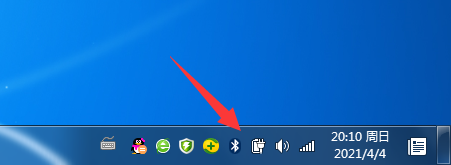
1、电脑右下角点击Bluetooth图标。

Bluetooth驱动程序怎么更新?

2、在Bluetooth设置下,点击选项。

Bluetooth驱动程序怎么更新?

3、继续选择属性。

Bluetooth驱动程序怎么更新?

4、在属性中,选择驱动程序选项。

Bluetooth驱动程序怎么更新?

5、继续点击更新驱动程序,即可为这个设备更新驱动程序软件。

Bluetooth驱动程序怎么更新?

© 2026 智德知识库
信息来自网络 所有数据仅供参考
有疑问请联系站长 site.kefu@gmail.com