1、打开手机浏览器。
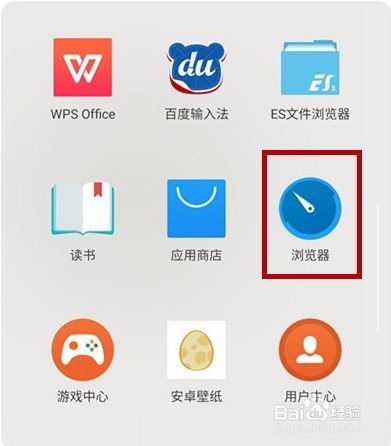
2、搜索新浪微博后,进入官网。

3、登录帐号密码。

4、登录后,在主界面点击“我”。

5、选择“设置”。

6、 选择“版本切换”。
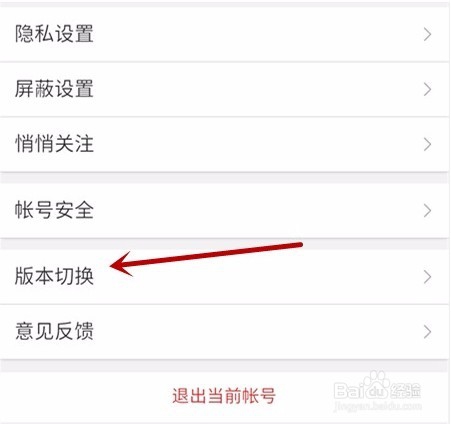
7、选择彩版。
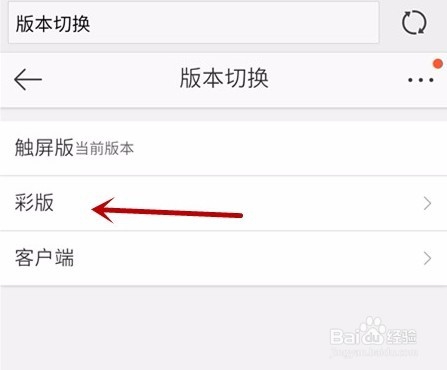
8、切换成功后,在主界面点击“设置”。

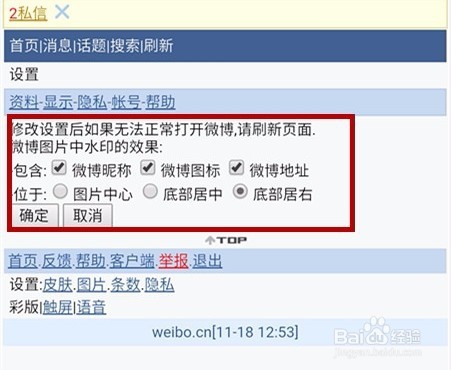
9、点击“水印设置”。

10、即可对微博水印进行设置,设置后点击“确定”即可。
1、打开手机浏览器。
2、搜索新浪微博后,进入官网。
3、登录帐号密码。
4、登录后,在主界面点击“我”。
5、选择“设置”。
6、 选择“版本切换”。
7、选择彩版。
8、切换成功后,在主界面点击“设置”。
9、点击“水印设置”。
10、即可对微博水印进行设置,设置后点击“确定”即可。