
3、书写hmtl代码。<div class="drag_div" id="drag_div"> <div class="one"><p class="img_100 margin_bottom_15"><img src="images/wall1.jpg"><p class="text_center">我是第一张</div> <div class="two"> <p class="img_100 margin_bottom_15"><img src="images/wall2.jpg"> <p class="text_center">我是第二张 </div> <div class="three"> <p class="img_100 margin_bottom_15"><img src="images/wall3.jpg"> <p class="text_center">我是第三张 </div> <div class="four"> <p class="img_100 margin_bottom_15"><img src="images/wall4.jpg"> <p class="text_center">我是第四张 </div> <div class="five"> <p class="img_100 margin_bottom_15"><img src="images/wall5.jpg"> <p class="text_center">我是第五张 </div> <div class="six"> <p class="img_100 margin_bottom_15"><img src="images/wall6.jpg"> <p class="text_center">我是第六张 </div> <div class="seven"> <p class="img_100 margin_bottom_15"><img src="images/wall7.jpg"> <p class="text_center">我是第七张 </div> <div class="eight"> <p class="img_100 margin_bottom_15"><img src="images/wall8.jpg"> <p class="text_center">我是第八张 </div> <div class="nine"> <p class="img_100 margin_bottom_15"><img src="images/wall1.jpg"> <p class="text_center">我是第九张 </div> <div class="ten"> <p class="img_100 margin_bottom_15"><img src="images/wall2.jpg"> <p class="text_center">我是第十张 </div></div>

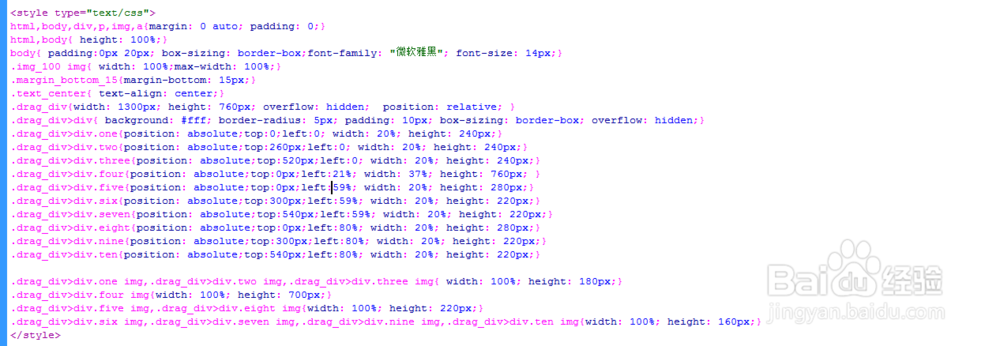
4、书写css代码。<style type="text/css">html,body,div,p,img,a{margin: 0 auto; padding: 0;}html,body{ height: 100%;}body{ padding:0px 20px; box-sizing: border-box;font-family: "微软雅黑"; font-size: 14px;}.img_100 img{ width: 100%;max-width: 100%;}.margin_bottom_15{margin-bottom: 15px;}.text_center{ text-align: center;}.drag_div{width: 1300px; height: 760px; overflow: hidden; position: relative; }.drag_div>div{ background: #fff; border-radius: 5px; padding: 10px; box-sizing: border-box; overflow: hidden;}.drag_div>div.one{position: absolute;top:0;left:0; width: 20%; height: 240px;}.drag_div>div.two{position: absolute;top:260px;left:0; width: 20%; height: 240px;}.drag_div>div.three{position: absolute;top:520px;left:0; width: 20%; height: 240px;}.drag_div>div.four{position: absolute;top:0px;left:21%; width: 37%; height: 760px; }.drag_div>div.five{position: absolute;top:0px;left:59%; width: 20%; height: 280px;}.drag_div>div.six{position: absolute;top:300px;left:59%; width: 20%; height: 220px;}.drag_div>div.seven{position: absolute;top:540px;left:59%; width: 20%; height: 220px;}.drag_div>div.eight{position: absolute;top:0px;left:80%; width: 20%; height: 280px;}.drag_div>div.nine{position: absolute;top:300px;left:80%; width: 20%; height: 220px;}.drag_div>div.ten{position: absolute;top:540px;left:80%; width: 20%; height: 220px;}.drag_div>div.one img,.drag_div>div.two img,.drag_div>div.three img{ width: 100%; height: 180px;}.drag_div>div.four img{width: 100%; height: 700px;}.drag_div>div.five img,.drag_div>div.eight img{width: 100%; height: 220px;}.drag_div>div.six img,.drag_div>div.seven img,.drag_div>div.nine img,.drag_div>div.ten img{width: 100%; height: 160px;}</style>
5、书写并添加js代码。;//通过class获取元素function getClass(cls){ var ret = []; var els = document.getElementsByTagName("*"); for (var i = 0; i < els.length; i++){ //判断els[i]中是否存在cls这个className;.indexOf("cls")判断cls存在的下标,如果下标>=0则存在; if(els[i].className === cls || els[i].className.indexOf("cls")>=0 || els[i].className.indexOf(" cls")>=0 || els[i].className.indexOf(" cls ")>0){ ret.push(els[i]); } } return ret;}function getStyle(obj,attr){//解决JS兼容问题获取正确的属性值 return obj.currentStyle?obj.currentStyle[attr]:getComputedStyle(obj,false)[attr];}function startMove(obj,json,fun){ clearInterval(obj.timer); obj.timer = setInterval(function(){ var isStop = true; for(var attr in json){ var iCur = 0; //判断运动的是不是透明度值 if(attr=="opacity"){ iCur = parseInt(parseFloat(getStyle(obj,attr))*100); }else{ iCur = parseInt(getStyle(obj,attr)); } var ispeed = (json[attr]-iCur)/8; //运动速度如果大于0则向下取整,如果小于0想上取整; ispeed = ispeed>0?Math.ceil(ispeed):Math.floor(ispeed); //判断所有运动是否全部完成 if(iCur!=json[attr]){ isStop = false; } //运动开始 if(attr=="opacity"){ obj.style.filter = "alpha:(opacity:"+(json[attr]+ispeed)+")"; obj.style.opacity = (json[attr]+ispeed)/100; }else{ obj.style[attr] = iCur+ispeed+"px"; } } //判断是否全部完成 if(isStop){ clearInterval(obj.timer); if(fun){ fun(); } } },30);}